Every file tool.
One tiny native app.
Replace 15+ single-purpose utilities with one 5 MB offline studio.
Menu bar screenshot rack, 35+ format converter, background remover + manual brush, face redactor, PDF editor & signer, clip trimmer, receipt OCR, storage map, and more — all one keystroke away.
Built for the file chores Finder still doesn't solve.
Try the batch renamer, filename-to-EXIF date parser, and Desktop screenshot sweeper directly in your browser.
Schermafbeelding)
See the real native app — pixel for pixel.
Every screenshot below was captured straight inside the native macOS app using sample studio files. Click any tool below or click the image to zoom in.
Ten native studios, one keystroke away.
Full-window interactive tools running 100% on-device with Apple Vision and Core Image. Press single-letter keys like A, B, X, or E straight inside File Studio.
Background Remover
One-click AI subject cutout with custom backdrop fill, Edge Feather, Expand/Shrink halo trim, Crop Tight, and live Erase/Restore brush.
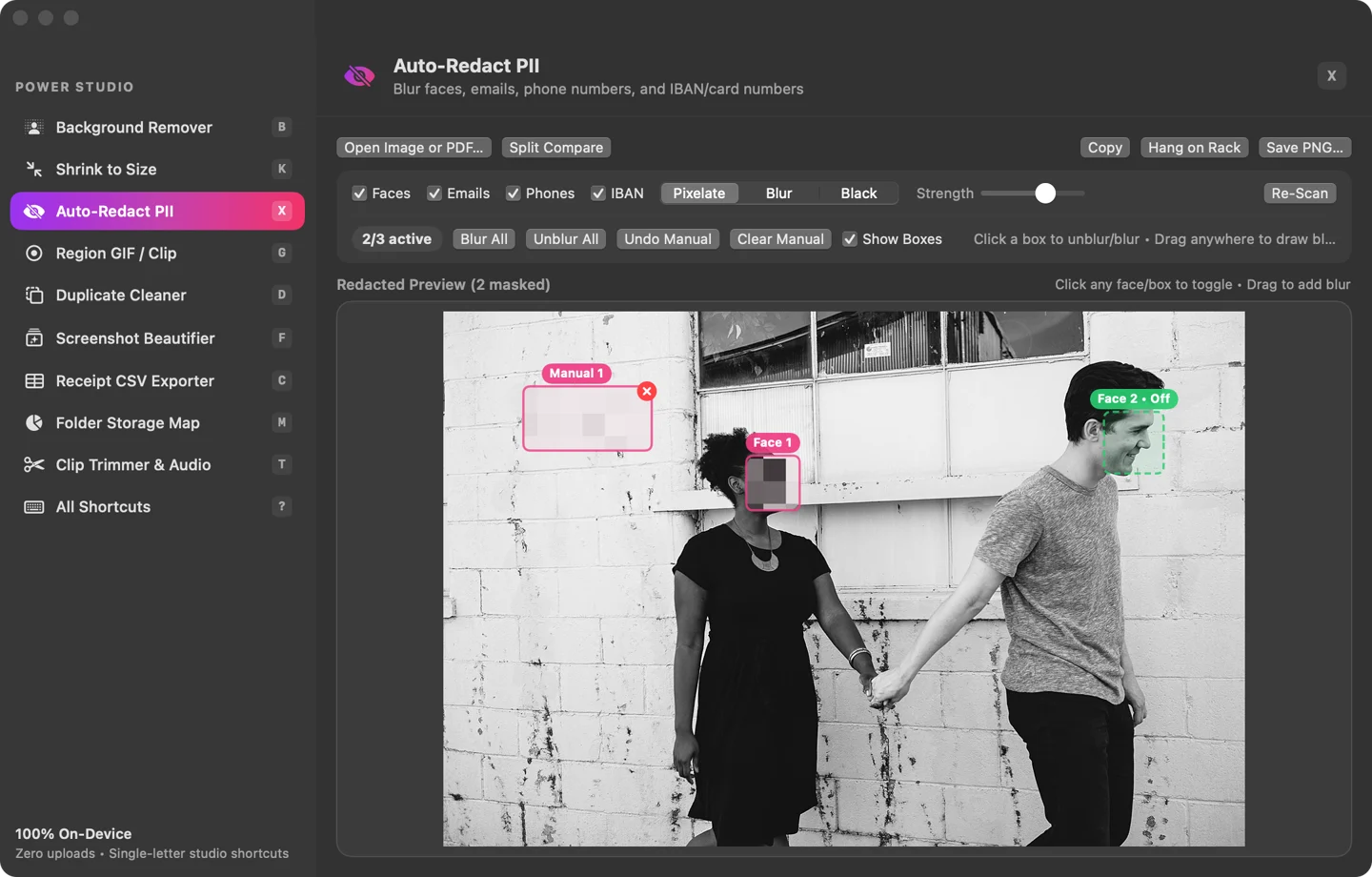
Interactive Auto-Redact
Detects faces, emails, phone numbers, and IBAN/cards. Click any face to toggle blur off/on or drag anywhere to draw manual blur boxes.
Shrink to Target Size
Pick an exact MB limit (1, 2, 5, 10, 25 MB) and compress PDFs, MP4/MOV clips, or photos to fit cleanly under attachment limits.
Region GIF / Clip Capture
Capture any region on screen (⌃⌥⌘G globally or G in studio) to GIF or MP4 and hang it right onto the Clothes Rack.
Duplicate & Similar Cleaner
Scans any folder for exact byte-for-byte duplicates plus visually similar burst photos, keeping the best copy safe.
Visual PDF Editor & Signer
Click pages to remove/restore, drag-reorder, insert PDFs or blank pages, draw your signature once, and stamp Confidential watermarks.
Screenshot Beautifier
Wrap plain screenshots in curated wallpaper gradients, soft drop shadows, rounded corners, aspect presets, and macOS window chrome.
Receipt CSV Exporter
Parses PDF and photo receipts locally to extract vendor, date, currency, category, and total into an editable spreadsheet & CSV.
Storage Map & Clip Trimmer
Drill down into disk space hogs visually (M), or trim video/audio clips, strip audio tracks, and export M4A/WAV/MP3 (T).
Hold a file + ⌥ to convert in place.
Grab any file in Finder or on the rack and hold ⌥ Option. The wheel shows valid output formats for that file and hides its current extension.
Restore capture dates and GPS from Google Photos Takeout.
Google Takeout splits photo timestamps and coordinates into separate .json sidecar files, causing Apple Photos to import everything as "Today". MetaSorta writes that metadata back into the image EXIF and Finder creation date.
Unzip your Takeout archive
Export your library from Google Takeout and extract the archive anywhere on your Mac.
Restore Google Photos EXIF & Date
Match sidecars automatically
Point File Studio at the folder. Photos with a matching JSON sidecar show a ✓ JSON badge.
Dates & coordinates written
Writes DateTimeOriginal, GPS tags, and filesystem creation dates, then optionally removes the .json files.
Small, native, and stays out of the way.
Quick Look, Markup, Redact, Eyedropper & OCR
Hover any hung screenshot and press Space to preview or E to annotate, blur sensitive text, crop, or sample a pixel's sRGB HEX value with an 11×11 loupe. Built-in Vision OCR copies text directly to the clipboard.
Auto-Hide Timer
After taking a screenshot, the rack drops down for 6 seconds so you can drag it into an app, then tucks back into the menu bar.
Single-Letter Shortcuts & Action Command Dialog
Press a single letter while browsing File Studio to launch any studio without four-finger chords — automatically paused whenever you rename files or type in a search field. Plus 3 global hotkeys (⌃⌥⌘Space / G / O) from any app.
Downloads Triage
Routes PDF invoices to Documents/Receipts, unmounts and trashes used .dmg installers, and runs on demand from the popover.
Strip Metadata & Shift Dates
Scrub GPS coordinates and camera serials before sharing images, or offset capture timestamps across a batch of files.
Visual PDF Editor & Signer
Click page thumbnails to remove or restore, drag to reorder, insert PDFs or blank pages, draw signatures, and stamp watermarks.
25 macOS Locales
Follows your system language and recognizes localized screenshot filenames (including Dutch soft-hyphen Schermafbeelding, German, French, and Turkish).
Latest Capabilities & Release Highlights
Full-window canvases for Background Removal, Auto-Redact, Shrink to Target Size, Region GIF Capture, Duplicate Cleaner, Screenshot Beautifier, Receipt CSV Export, Storage Map, and Clip Trimmer.
Click any detected face or PII region to toggle blur off/on or drag anywhere to draw manual blur boxes. Background Remover includes Feather, Edge Expand/Shrink, Color Fill, Crop Tight, and Erase/Restore brush painting.
Replaced the old toolbar dropdown with a searchable Glass command center with quick image convert/resize pills, plus fast single-letter keys across File Studio and Power Studio.
Click pages to remove/restore, drag-reorder, draw signatures & watermarks (E / W), hang screenshots without auto-copy, and view native Apple Music/Photos icons and thumbnails.
One tiny app. 15+ everyday file tools.
Free download. Runs natively on macOS Sonoma/Sequoia and Windows 10/11 (x64).
• macOS: If Gatekeeper prompts on first launch, open System Settings → Privacy & Security → Open Anyway, or run:
xattr -cr /Applications/MetaSorta.app• Windows: Requires the .NET 8 Desktop Runtime (
winget install Microsoft.DotNet.DesktopRuntime.8). If SmartScreen warns on an unsigned binary, click More info → Run anyway.